
Download DrinkApp APK – order drinks, drink delivery, bar app, off-licence delivery, mobile ordering, Android app
Overview
DrinkApp is a lifestyle-focused mobile application designed for Android users seeking a seamless and efficient way to order drinks. The app streamlines the process of selecting and receiving beverages, whether at a bar or from a local off-licence. By leveraging GPS technology, DrinkApp helps users locate nearby venues in real time, eliminating the need to search manually.
Once at a venue, users can place drink orders directly through the app and have them delivered to their table, reducing wait times and enhancing the overall experience. For those preferring to stay at home, the app enables convenient carryout orders with doorstep delivery. Payment is handled securely within the app using credit/debit cards, Google Pay, and Apple Pay, ensuring a frictionless transaction.
The app is tailored for social users, casual drinkers, and anyone looking to simplify their beverage ordering process. It is available exclusively on Android devices, making it accessible to a broad base of mobile users who value convenience and time-saving solutions.
Key Features & Capabilities
- GPS-Based Venue Discovery – DrinkApp uses built-in GPS to locate nearby bars and off-licences, helping users quickly find the closest options based on their current location.
- Mobile Ordering at Bars – Users can place drink orders directly from their table, bypassing queues and wait times at the bar counter.
- Doorstep Delivery from Off-Licences – The app supports home delivery of drinks from local off-licences, ideal for evening relaxation or hosting gatherings.
- Multiple Payment Methods – Secure in-app payments are accepted via credit/debit cards, Google Pay, and Apple Pay, supporting fast and safe transactions.
- Real-Time Order Tracking – Users can monitor the status of their order from placement to delivery, ensuring transparency and timely service.
These features cater to users who prioritize convenience and efficiency. For example, a user at a busy bar during a weekend night can order drinks without leaving their seat, while someone at home can place a last-minute order for a party without leaving the house. The integration of location services and secure payment options enhances usability across different scenarios, making the app suitable for both social outings and quiet nights in.
User Interface, Workflow & Performance
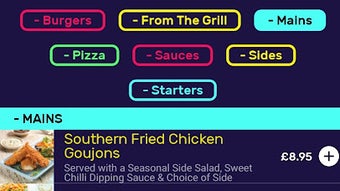
The user interface of DrinkApp is designed with simplicity and speed in mind, focusing on intuitive navigation and quick access to core functions. The main screen typically displays nearby venues, with clear visual indicators and distance markers to help users make informed decisions. From there, users can browse drink menus, customize orders, and proceed to checkout with minimal taps.
The workflow is streamlined to reduce friction—ordering at a bar or from an off-licence follows a similar path, ensuring consistency across use cases. Navigation is likely optimized for touch-based interaction, typical of Android applications. While specific performance data such as CPU or RAM usage were not provided, the app’s 18.4 MB file size suggests a lightweight design, which may contribute to efficient operation on mid-range devices.
The developer did not specify resource usage details. Stability and responsiveness are expected to align with standard Android app behavior, though real-world performance may vary based on device hardware and network conditions.
Compatibility & System Requirements
DrinkApp is designed exclusively for Android devices, ensuring compatibility with a wide range of smartphones and tablets running the supported operating system. The current version is 1.2.3, released on November 15, 2023. The app has a file size of 18.4 MB, which is relatively small and suggests efficient resource management.
Exact system requirements were not listed, so users should ensure their device meets general Android standards for app installation. The developer did not provide additional system requirements. Compatibility with older Android versions is not confirmed, but the app’s lightweight size may improve the likelihood of broad device support.
Users should verify that their device’s operating system version is compatible with the app’s minimum requirements, though this information is not currently available.
Pros and Cons
Pros
- Intuitive interface designed for quick and easy use
- Real-time location-based venue discovery
- Supports both in-bar and home delivery options
- Multiple secure payment methods integrated
- Lightweight app size (18.4 MB) for fast installation
Cons
- Available only on Android, limiting access for iOS users
- Exact system requirements not disclosed
- Performance details not specified
- No information on offline functionality
- Availability restricted to specific geographic regions (implied)
FAQ Section
Is DrinkApp available for iOS devices?
As of the current release, DrinkApp is available exclusively for Android users. There is no official iOS version announced.
How do I make payments in the app?
DrinkApp supports secure in-app payments using credit/debit cards, Google Pay, and Apple Pay. All transactions are processed within the app.
Can I use DrinkApp without an internet connection?
While the app requires an active internet connection for location services, ordering, and payment processing, it may cache some data for limited offline access. However, full functionality is dependent on connectivity.
Is the app free to download and use?
Yes, DrinkApp is available to download and use at no cost. The app is free to install and use, with no subscription fees.
How often does the app receive updates?
The app was last updated on November 15, 2023. Regular updates are expected to improve functionality and fix bugs, though the update frequency is not publicly disclosed.
Final Thoughts + CTA
DrinkApp delivers a modern, convenient solution for ordering drinks, whether at a bar or from home. Its focus on user experience, combined with location-based discovery and secure payment integration, makes it a practical tool for Android users who value time and ease. While the app’s availability is limited to Android and some system details are not fully disclosed, its lightweight design and intuitive workflow suggest broad accessibility.
For social users, party hosts, and anyone looking to avoid queues and cash handling, DrinkApp offers a reliable way to enjoy beverages with minimal hassle. The free model further enhances its appeal. Download DrinkApp now and experience the future of mobile drink ordering.







